 UFO
UFOCreate an interpretation
An interpretation is an alternative explanation of what was seen (a kite, a planet, an aircraft), written as an observation of its own and replayed beside the witness's.
In the case editor#
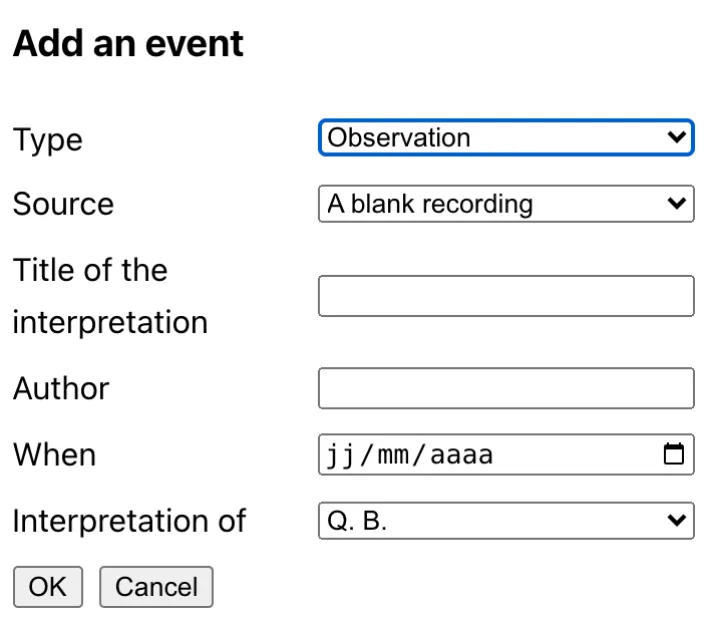
In the case editor, an interpretation is added with the + button, as an observation that names the one it interprets.
- Open the case, or add the witness's observation to a new one. The interpretation needs a primary observation to be an interpretation of.
- Press + and keep the type Observation. In Interpretation of, choose the primary observation: that is what makes it an interpretation and not another witness.
- Choose where it starts: a blank recording, a JSON file or an address. Give it a title (“A kite”) and an author, then confirm.
- It opens in the observation editor. Describe what the alternative would have looked like: the bodies it is made of (the Bodies group), and which shapes of the witness's account each one explains. The player then shows the two side by side.
- Save the case. The primary observation cannot be deleted while an interpretation refers to it: delete the interpretations first.
By hand#
In case.json, an interpretation is an event of type sighting that names, in interpretationOf, the id of the observation it interprets (or several), and has a url of its own:
{
  "events": [
    { "type": "event", "eventType": "sighting", "id": "kite", "interpretationOf": "qb",
      "title": "A kite", "url": "reading-kite.json" }
  ]
}
Its recording is written like any observation, with bodies that say which shapes they explain.
To go on#
What a case is, how events are linked, and how an interpretation is written, field by field.