 UFO
UFOCreate an interview
An interview is a conversation held with a witness. Add it to the case, say who took part and how, and give it its transcript if you have one.
In the case editor#
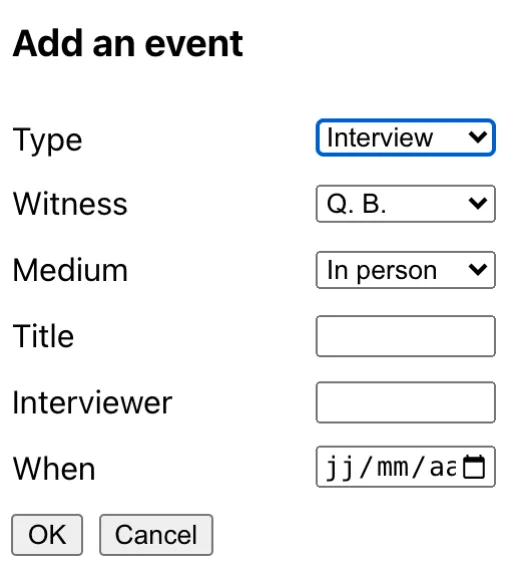
In the case editor, an interview is added with the + button, beside the observation of the witness it was held with.
- Open the case. The witness's observation has to be in it: an interview is held with an observation.
- Press + and choose the type Interview. Say whom it was held with (Witness), its title, who held it (Interviewer, one name or several separated by commas), the Medium and the date.
- It opens in the interview editor. The Summary group holds what it established; tick more witnesses if several were interviewed together.
- To add the transcript, open the File group and Load a file: your own format, or a WebVTT or SRT file from a recording tool, a text with a name before each turn, or plain paragraphs. What cannot be guessed (who speaks) is corrected in the text.
- In the Exchanges group, read it as a dialogue. Take out what must not be published (private life, an exact place) by giving the passage a
redactedwith its reason, and note who has approved the transcript. - Save the case: the interview and its transcript are written beside it.
By hand#
In case.json, an interview is an event of type interview, with the id of the observation it was held with in interviewOf, and the transcript's file as its url:
{
  "events": [
    { "type": "event", "eventType": "interview", "id": "interview-qb-1", "interviewOf": "qb",
      "time": "2026-10-13 21:27", "medium": "video", "by": [{ "people": "BeauJerome" }],
      "title": { "en": "Video interview with Q. B." }, "url": "interview-qb-1.json" }
  ]
}
The transcript is a file of its own, with its speakers and its turns of speech.
To go on#
What an interview is, passages taken out, approvals, links to the observation, and the transcript file, field by field.